Category Archives: Archive

Meal plans still available

It’s not too late to get a meal plan and/or Flex Dollars if you haven’t already. Find out more about your meal plan options: drake.sodexomyway.com/my-meal-plan/index

Students who wish to have a Commuter Meal Plan should log into my.drake.edu, click on the fork and knife icon (Housing & Meal Plans), and click “Apply Here.” Finally, click on “Commuter Fall 2021” application to begin the process of getting a commuter meal plan.

Once submitted to the Housing & Meal Plans portal for approval, students will receive an email to their drake.edu email account that will tell the next steps in completion of choosing a meal plan and final confirmation of this request.

If there are any questions, please contact housing@drake.edu.

— Casey Morgan, Dining Services

Drake track and field tryouts

The Drake University track and field program will hold tryouts Sept. 29  from 3:30–4:45 p.m. for both men’s and women’s track and field. To participate:

  • Email Asha Gibson at asha.gibson@drake.edu with intent to tryout.
  • Attend an interest meeting Wednesday, Sept. 22, at 6 p.m. Location details will only be provided to individuals who submit email of intent to tryout.

— Asha Gibson-Smith, Athletics

BUILD Fall 2021 learning and development schedule

Bulldogs United In Learning Drake (BUILD) is a learning and development series available to faculty and staff who wish to enhance their professional skills, improve their wellbeing, and expand their boundaries.

We encourage all employees to check out the BUILD Fall 2021 schedule that is now available on myDrake. To register for any class, send an email to linda.feiden@drake.edu.

September offerings:

Microsoft Teams Calling Level 100
Sept. 14 from 11 a.m. to 12 p.m.
Microsoft Teams

Take a Mindfulness Break: Breathing, Dynamic Breathing, & Body Scan
Sept. 15 from 12–12:30 p.m.
Microsoft Teams

Take a Mindfulness Break: Gatha (Meditation Poems)
Sept. 30 from 12–12:30 p.m.
Microsoft Teams

Active Shooter Training
Sept. 21 from 12–1 p.m.
Olmsted Center, Conference Rooms 310–311

Overcoming Anxiety as We Return to Work
Sept. 23 from 2–3 p.m.
Microsoft Teams

It’s Not You, It’s the Situation! Tools for Identifying and Combating Pandemic Fatigue
Sept. 29 from 11 a.m. to 12 p.m.
Microsoft Teams

— Linda Feiden, Human Resources

Careers in social change virtual panel series

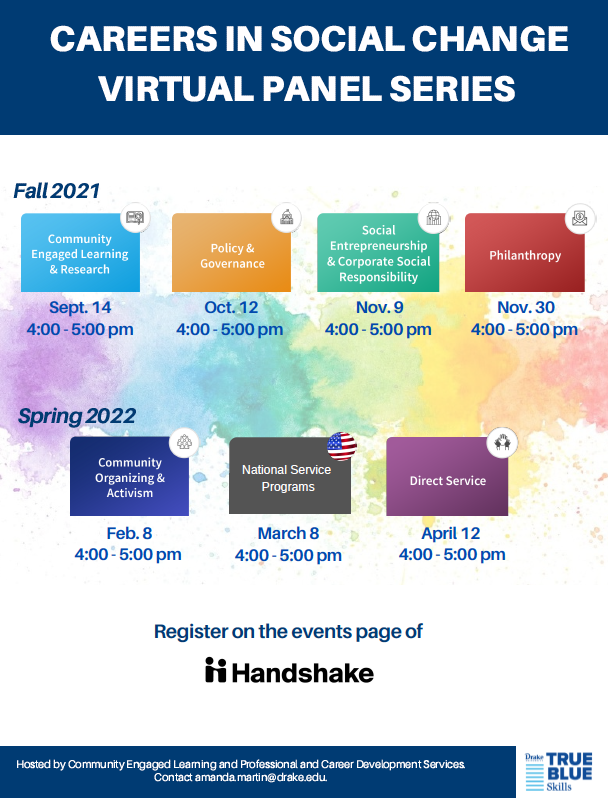
Have you ever thought about how you can make a difference in your career? Check out the Careers in Social Change Virtual Panel series taking place the second Tuesday of the month this Fall from 4–5 p.m. via Zoom. The panels include representatives from local businesses and organizations who will share about their career and educational paths and how they think they make a difference with their career.

The first panel will be Tuesday, Sept. 14, from 4–5 p.m. on the topic of Community Engaged Learning and Research, and will feature Director of Community Engaged Learning Renee Sedlacek Lee, and several faculty members who have conducted community research. You can register for this panel and all other panels on Handshake. Reach out to amanda.martin@drake.edu with questions. The series is sponsored by the Office of Community Engaged Learning and Professional and Career Development Services.

— Amanda Martin, Community Engaged Learning

Study abroad in Spain Spring 2022

The Global Engagement office is excited to announce our new study abroad program in Seville, Spain for the Spring 2022 semester. Students with or without a background in Spanish are invited to apply to the program and join a Drake faculty member and group of students studying in Spain Jan. 18 to May 18, 2022. The program is open to Drake students who are Sophomores, Juniors, or Seniors. The first 10 students to commit to the Drake in Spain program will be given a $500 scholarship to attend the program.

You can read more and apply to the program by Sept. 15: drake-sa.terradotta.com/?go=Seville

Students who want to learn more about the program can attend one of the following sessions:

Additionally, students are invited to email studyabroad@drake.edu with questions, or to setup an appointment.

— Karen Williams, Education Abroad Advisor

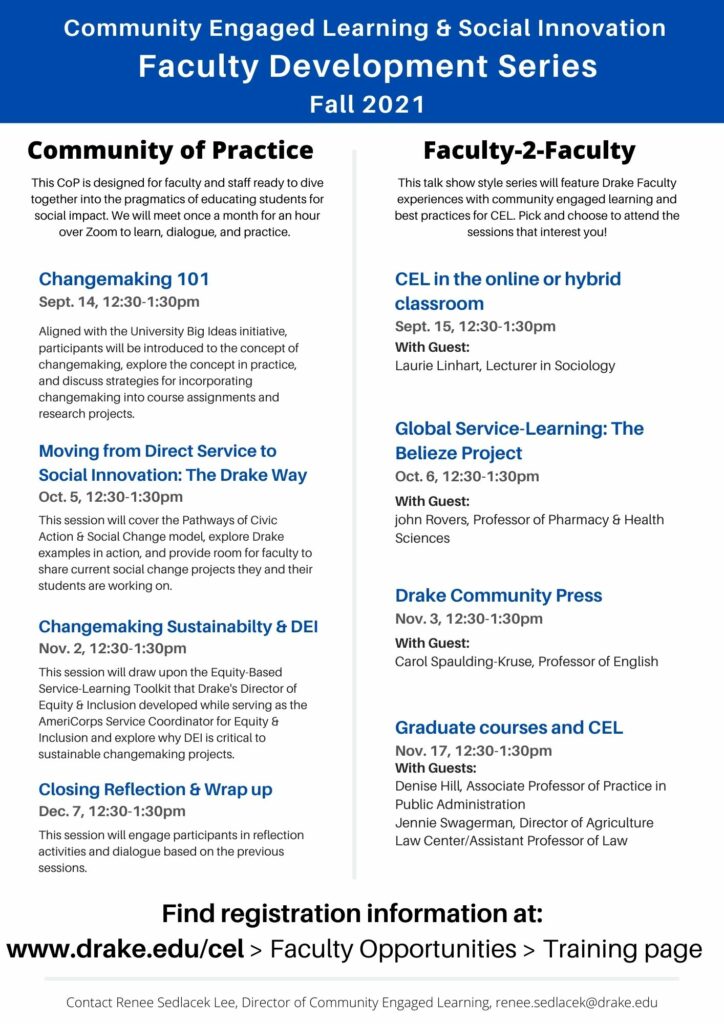
Changemaking 101: Engaging Students for Social Impact

Aligned with the University’s Big Ideas initiative, participants will be introduced to the concept of changemaking, explore the concept in practice, and discuss strategies for incorporating changemaking into course assignments and research projects.

This session will be held virtually via Microsoft Teams.

RSVP on Eventbrite

Facilitated by: Renee Sedlacek Lee, director of Community Engaged Learning, and Dr. Sara Johnston, Olson Fellow for Global Service-Learning, and Dr. Jimmy Senteza, director of the Rolland and Mary Nelson Institute for Diplomacy and International Affairs.

Guest presenter: Susan Sanning, associate dean and director of service and social innovation in the Center for Careers, Life and Service at Grinnell College.

This session is the first in a series offered this fall by the Office of Community Engaged Learning. For more information about upcoming faculty and staff development for engaging students in social impact visit: drake.edu/cel or contact renee.sedlacek@drake.edu.

Renee Sedlacek Lee, Community Engaged Learning

Constitutional Law Center announces 2021 Constitution Day speaker

The Drake University Constitutional Law Center is pleased to announce Dahlia Lithwick as the 2021 Constitution Day speaker. Lithwick will present “Covering the Courts: What Role Does the Supreme Court Press Play in Protecting the Constitution?” The lecture is scheduled for Sept. 17, 2021, at 3 p.m. and will be delivered virtually.  Register.

Dahlia Lithwick is a senior editor at Slate where she has written her “Supreme Court Dispatches” and “Jurisprudence” columns since 1999. Her work has also appeared in the New York Times, Harper’s, and the Washington Post, among other publications. She is host of “Amicus,” Slate‘s award-winning biweekly podcast about law and the Supreme Court. Lithwick earned her BA from Yale University and her JD from Stanford University. She is currently working on a new book, Lady Justice, for Penguin Press.

The Drake University Constitution Day Lecture is held annually to commemorate the signing of the Constitution on September 17, 1787, and to recognize all U.S. citizens.

Register for the event.

— Theresa Howard, Law School

Jewish holidays calendar for download

On Thursday, Aug. 26, you should have received an email with a link to calendar entires to mark the significance of the upcoming Jewish holidays: Rosh Hashanah, Yom Kippur, and Passover.

These calendar entries are a reminder to not schedule co- and extracurricular events on these Jewish holidays as well as the evenings prior (each of these holidays begins at sunset the prior day).

Open the email sent Aug. 26 with the subject line “Jewish Holidays Calendar for Download” and follow the steps below to add the holidays directly to your Outlook calendar:

For PC computers:

  1. Drag the .ICS file (attached in my email sent to campus Aug. 26) into your calendar tab. The dates should appear on your personal calendar.

For Mac computers: 

  1. Double-click the file to open it. If it doesn’t open, you might need to save your file to your computer before you can open it. 
  2. When you open the .ICS file, Outlook opens automatically. The event will open in a separate window with the subject: Rosh Hashanah.  
  3. Click Save & Close on the event window to save the holidays to your calendar. 

The individual dates are also listed below if you need to add them manually.

There are several holidays in which Jewish law officially says Jewish people are not to work and there are parts of the country where, whether or not you are Jewish, your business or organization would be closed in observance of these holidays (New York City, for example!).

I want to urge the Drake campus community to avoid scheduling events on:

  • Rosh Hashanah, which is the Jewish new year. (In 2021, beginning at sundown on Sept. 6 and concluding the night of Sept. 8).
  • Yom Kippur, which is the Day of Atonement and considered the holiest day in the Jewish calendar. (In 2021, beginning at sundown on Sept. 15 and concluding the night of Sept. 16.)
  • The first and second days of Passover mark a week of honoring the deliverance of the Hebrew people from enslavement in Egypt and through a seder—a ritualized meal, shared in community while remembering the Jewish story of liberation. (In 2022, beginning at sundown on April 15 and concluding the night of April 17.)

Many Jewish members of our community cannot participate in anything that we schedule on these dates.

I want to strongly encourage you to import these calendar holds, and especially as Rosh Hashanah is only a few weeks away. But also, the Office of Equity and Inclusion is working on creating a University-wide Outlook calendar that is inclusive of other major religious holidays. We plan to have this available for you sometime in the next several weeks.

Jewish Holidays

2021
Rosh Hashanah      
Evening (6:00) September 6 all the way through September 8, 2021

Yom Kippur
Evening (6:00) September 15 all the way through September 16, 2021

Passover
Evening (6:00) April 15 all the way through April 17, 2022

2022
Rosh Hashanah        
Evening (6:00) September 25 all the way through September 27, 2022

Yom Kippur
Evening (6:00) October 4 all the way through October 5, 2022

Passover
Evening (6:00) April 5 all the way through April 7, 2023

2023
Rosh Hashanah       
Evening (6:00) September 15 all the way through September 17, 2023

Yom Kippur
Evening (6:00) September 24 all the way through September 25, 2023

Passover
Evening (6:00) April 22 all the way through April 24, 2024

— Jen Harvey, Associate Provost of Campus Equity and Inclusion

ITS changes and reminders for the new semester

As we start a new semester, here are a few changes, and reminders about all things tech at Drake.

ITS support: Due to campus COVID-19 protocols, the support center in Carnegie Hall is not open for walk-in assistance for faculty and staff. Visit our IT service portal at service.drake.edu/its (or click the ITS Support button in myDrake) to find answers or report any tech issues. You can also call 515-271-3001. Teaching on campus and have a classroom emergency? Call ext. 3002.

ITS staff are able to resolve many problems remotely. In-person appointments will only be scheduled if remote resolution doesn’t work.

eduroam wireless network: Connect to the eduroam network on campus and sign in using your Drake email address and password. Reminder: DUGuest is only for visitors and many campus resources are unavailable from this limited network.

Blackboard Learn Ultra: Within Blackboard Learn Ultra you’ll see a little purple question mark in the bottom corner of your screen where you can access help. If you run into technical issues, visit the Blackboard Learn Ultra category in the IT Service Portal to request assistance. Learn more about changes and key features at www.drake.edu/its/learnultra.

MyDUSIS/Self Service: Over the summer, we released updated screens and functions in MyDUSIS/Self Service. There are two new buttons in myDrake in the Human Resources section: My Information and Employee Dashboard. My Information takes you to an updated screen to access your personal information. You’ll go to the Employee Dashboard to submit or approve time or leave, view your tax information, review past jobs, and access your pay information. Learn how to use these updated features in the MyDUSIS/Self Service guides in the IT Service Portal.

Campus printing: New printers are being rolled out across campus, so if you don’t see a new device in your area, you will sometime this semester. Reminder: faculty/staff prints and copies now charge to your home organization in Banner- the department that pays your salary, instead of being able to select from multiple FOAPALs. Learn more by visiting the printing project FAQ at www.drake.edu/its/printing or Printing for Faculty and Staff (How-to)

Connect with ITS: Want to know about tech changes? Outages? Watch for more ITS information in upcoming issues of OnCampus, follow Drake ITS on Twitter @DrakeITServices, watch our news feed on drake.edu/its or service.drake.edu/its, or sign up for outage text messages by texting DrakeITS2021 to phone number 226787. NOTE: You must be already signed up to receive texts from Bulldog Alerts to add the ITS outage messages.

Not sure what other tech Drake ITS offers? Visit drake.edu/its/facstaff to learn about tech resources and tools available to you.

— Carla Herling, ITS