First-generation college students are an important part of the Drake community—about 14% of our campus community are first-gen students. Drake defines this as a college student whose parents/legal guardians have not received a bachelor’s degree from a four-year university. The office of New Student Programs offers resources and programs to support first-generation students at Drake.
We will be celebrating National First Generation Student Day on Monday, Nov. 8. If you are a Drake student, staff, or faculty member that identifies as first generation, stop by the Olmsted Center breezeway between 12–4 p.m. on Nov. 8 for a special first-gen Bulldog button and treat! Griff will also be in attendance between 1–2 p.m.
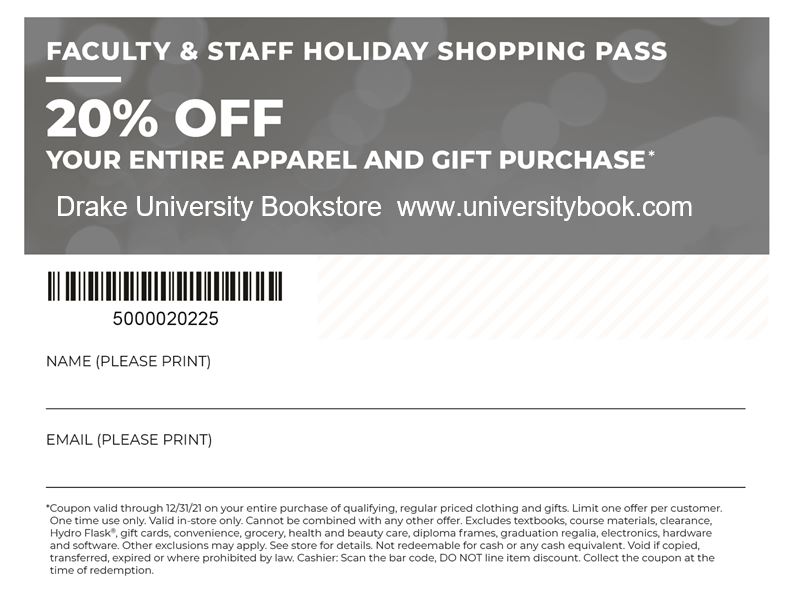
Once again, we want to say thank you for all the collaboration over the years between Drake University and the University Bookstore. We wouldn’t be here without your support. As a thank you, we are giving you a holiday shopping pass. This pass is valid through the end of the year giving you flexibility with your schedule, and will give you 20% off Drake branded apparel and gifts.
Within the holiday pass, we are hosting a food drive for the Little Free Pantries initiative on Dec. 1. On this day, bring in any non-perishable food or hygiene products, we will increase your discount to 25% off your total. Griff II will also be in-store for any photo-ops from 12–1 p.m. and will sign purchases of his new 2022 calendar.
If you are unable to visit the store to redeem this holiday pass, please reach out to me for an online exclusive pass.
On Oct. 22, All Staff Council and Human Resources teamed up to host the first of its kind virtual town hall. We estimate approximately 200 employees caught some or all of the event. Thank you to everyone who attended. For anyone who missed it, you can access the recording here.
The agenda and speaking points were built around the questions submitted to ASC in the weeks preceding the event. If you submitted one or more questions, thank you! ASC was thrilled to receive dozens of questions addressing a range of subjects. Unsurprisingly, we received the most questions about staff compensation. Consequently, the bulk of the town hall time was spent on this topic. There was also keen interest in paid leave practices; remote work; performance management; employee morale, engagement, and retention; benefits; and diversity, equity, and inclusion. None of these is an easy topic to discuss. We are very appreciative of the thoughtful and respectful questions, ideas, and suggestions offered throughout the event.
We continue discussing how to best follow-up on the insight both HR and ASC walked away with after the town hall. That is arguably a mark of a successful discussion: those facilitating were left with a lot of new ideas, a more informed perspective, and a clearer appreciation of what employees are wanting and needing from them. We thank you for that.
One of the questions we have is whether we should facilitate such an event again? If you attended all or part of the town hall, or watched the recording, please offer event feedback here. This short, three-question survey will only take you a minute to complete, but it will provide us with important information going forward.
Please know that you do not need to wait for an event to engage All Staff Council or Drake Human Resources. If you have an idea or concern you would like to share with ASC, simply use this link to reach us. Drake HR is also here for you. You can reach HR any time at drakehr@drake.edu.
Thank you again for your time, generosity of spirit, and tremendous commitment to our Drake community.
— All Staff Council–Executive Council and Human Resources
Human Resources wants to thank everyone who took time to respond to this year’s Survey of Administrative Services (SAS). We wanted to share some of the feedback received. Generally, your responses inform us as we look at our customer service standards and the list of projects and priorities we are compiling. Your feedback is insightful and helpful in both regards.
Regarding the quantitative aspects of the survey, here are some of the core data responses—with items listed by high to low:
Please rate your level of agreement with the following statements:
Field
Mean (out of 5)
HR staff are professional.
4.91 (most agreed)
HR staff are courteous.
4.90
HR staff are knowledgeable.
4.73
HR staff respond to my inquiries in a timely manner.
4.11 (least agreed)
Please rate your level of satisfaction with the following services provided by Human Resources staff.
Field
Mean (out of 5)
Benefits enrollment and open enrollment
4.46 (most satisfied)
Wellness Programs
4.40
Staff Professional Development Programs
4.19
Hiring process (job creation, posting, offer)
4.13
HR Partner Services
4.08
Manager Professional Development Programs
3.70
Performance Evaluations
3.53 (least satisfied)
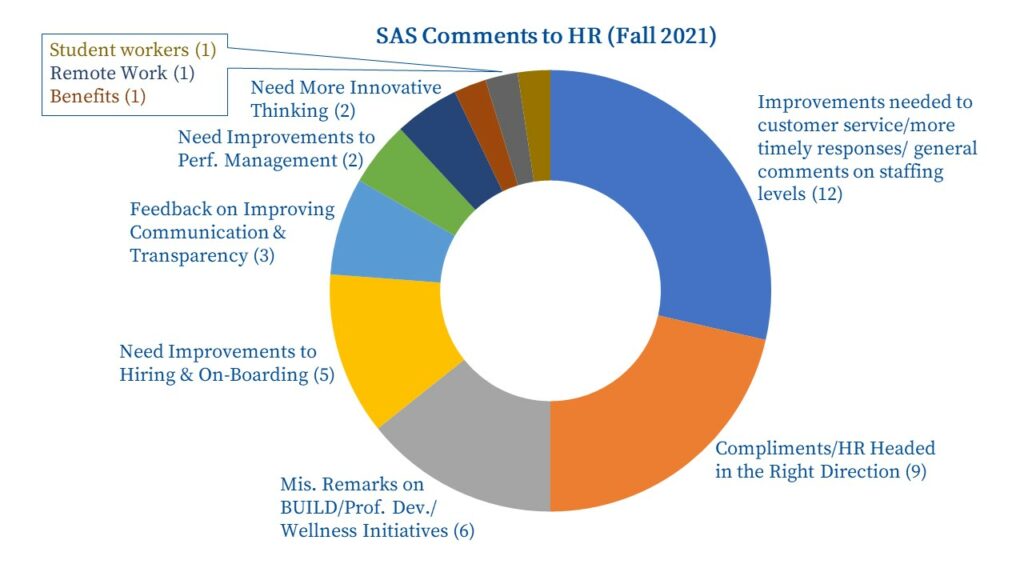
We earned respectable marks on living Drake’s Core Values—though there is certainly additional work to be done there. Overall, we received a 4.29 on how satisfied responders were with Human Resources. We think we can do better! Interesting data, but the comments are really where the gold can be found. Over forty people took the time to provide feedback. Here’s a graphic to help illustrate what was top of mind:
Some important take-aways from the written responses:
With Gratitude: Campus has shown us tremendous Generosity of Spirit as we have worked through extended vacancies. We are now fully staffed—though three of us are new and very much still learning. We received many comments where people offered constructive feedback but recognized we have been working with less than a full team. We are tremendously thankful for your patience and understanding.
Up Our Customer Service Game: The longer-term members of the HR team all took on more work when we had vacant positions. We know this sometimes resulted in delayed responses when employees and managers sought HR assistance. Additionally, we have not historically had one person who “owned” the main phone line or HR email address. We do now. Improving response time, establishing customer-service expectations, and creating more efficient and effective processes were already top-of-mind for us. Your responses just further illustrate the need to prioritize these topics. We hear you! In fact, we will be sharing with campus an updated customer service model in late November, once we are on the other side of the Open Enrollment rush.
Space for Better Performance Management/Professional Development: It is clear both managers and employees want better processes and tools relating to performance management and professional development. Performance management was something we already identified as an opportunity and a priority. We want to be sure we are training managers, offering paths to staff for professional growth, and facilitating continuous learning and improvement. We will start working on these in early 2022.
Enhance Recruitment/Onboarding Processes: It appears that HireTouch is perhaps the least popular member of our team. It has some quirks, which makes an already lengthy process even clunkier. We will look to see how we can make improvements and provide additional training and resources to trouble-shoot HireTouch quirks. We will definitely spend concentrated time on the entire talent acquisition process.
In fact, HR applied for a True Blue Micro-Internship to have a student help us benchmark onboarding processes with higher education and private industries, as we know this is an area with opportunities for improvement. As luck would have it, our application was accepted and that project starts in early November! Additionally, with our vacant positions now filled, we are shifting Anthony Leto into a role where he can focus on talent acquisition and we’ll be building up a whole new set of tools, resources, trainings, and templates to help us rethink recruitment at Drake.
There were informative comments on several other topics as well, but we wanted to share some of the pronounced themes. Collectively, the SAS results will help us identify top priorities for the rest of the academic year and beyond. Again, we are very thankful for your honesty, ideas, and suggestions. As we further develop a plan of action for HR, we will share and there will also be times when we invite additional feedback to dive deeper into many of these specific topics. We hope you will continue to be willing to help us help you!
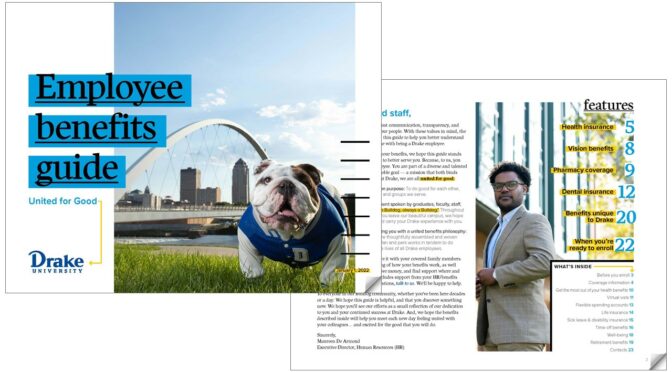
Human Resources is proud to present a new resource to prospective, new, and existing Drake employees—a beautiful and detailed digital benefits guide. The idea behind this guide dates back well over a year and it has been a work in progress since then. Updated with plan year 2022 information—including details about the new partnership with Broadlawns Medical Center—the guide is now ready for distribution. The guide will be attached to tomorrow’s HR Monthly email. You can also access it online.
This guide represents a considerable investment of time and effort, and it is unlike any benefits resource previously offered to Drake employees. Our hope is that this guide will be truly helpful to prospective and new employees who are digesting Drake’s wide range of benefits for the first time. Additionally, many existing employees—even those well-acquainted with our benefits—will likely learn a thing or two after reviewing the guide.
As you navigate the Annual Open Enrollment Period for plan year 2022, we encourage you to spend some time with this new resource. It will provide a wealth of information and answers, and better illustrate the generous benefits offered to Drake employees.
Navigation Tips: See “Features” and “What’s Inside” on page 2 for topics covered in the guide. However, you can always “Control F” to search for specific terms. Hover your mouse over text with a dotted red underline to access additional, pop-up information. Dark blue text represents terms embedded with hyperlinks that will take you to right to the page or resource being discussed.
Every Tuesday in OnCampus the Deputy Provost shares two articles with a read time of 10 minutes.
In collaboration with Drake’s Office of Sponsored Projects and Research, the Deputy Provost’s office is hosting a conversation on Funding Your Research and Creative Activity Friday, Nov. 19, from 1–3 p.m. in Howard Hall, Room 210. Please register here. We will use our time together to discuss both intramural and extramural grantspersonship—specifically thinking through how to grow external grant capacity from internal awards, how to position your work as related to institutional and professional priorities, and how to collaborate across the University.
Professor Dian Nostakasari (ENSS) is a terrific example of a scholar doing excellent work at the intersections of several disciplinary areas. She will be presenting in Howard Hall, Room 210, on her project, “Inhabiting Digital Spaces as a Right to the City” on Friday, Nov. 5, from 11:30–12:15. Registration has closed to facilitate ordering lunch for participants—but feel free to email renee.cramer@drake.edu if you plan to show up, but haven’t yet registered—we can add to our order and have food for all who attend.
Every Tuesday in OnCampus the Deputy Provost shares two articles with a read time of 10 minutes.
There is no doubt that we have changed, as an institution and as a faculty, from our experiences in the past 18 months. While the pandemic is not over, and the “return to normal” is something I am suspicious of, it does seem a good time to begin to reflect on what we’ve learned. Who is “in” for this exploration? I’m seeking nominations for people to form a loose working group—meeting pretty regularly from December to May—to understand the impact that COVID-19 has had on the way we approach our students, our classrooms, our profession. Please email renee.cramer@drake.edu to volunteer yourself and nominate your colleagues. We’ll meet in ways that are generative, not onerous; and we’ll develop an institutionally-useful report on what we learn about how our approaches have grown and changed.
Additionally, information sessions for each of the Summer 2022 travel seminars will be held in the coming weeks. For Germany & Poland, a virtual session will take place on Tuesday, Nov. 16, at 5 p.m. For Uganda, an in-person session is scheduled for Monday, Nov. 15, at 5 p.m. in Meredith Hall, Room 102. Session links and additional information on these events can be found on the University calendar.
To apply for a travel seminar, visit Terra Dotta, Drake’s online application portal. Use your Drake ID and password to login.
For questions about a specific travel seminar, contact the course instructor. For general study abroad questions or issues with Terra Dotta, contact studyabroad@drake.edu.