
Join Community Engaged Learning April 7 at 3:30 p.m. for a ribbon cutting ceremony to celebrate the start of a new growing season at the new Sprout Garden location. The garden moved from its long-time location at Forest Avenue and 25th Street this past fall, to its new location of 30th Street and Carpenter Avenue. All are invited to come out and see the new space, hear remarks from those involved with the project, and learn about ways to get involved. RSVPs are encouraged by March 30 so we can prepare for refreshments.
All posts by Amanda Martin
Blackboard Learn Ultra instructor orientation course module 6 now available
About Module 6: This newly released self-paced module is expected to take about 2–3 hours and is focused on the most widely used Ultra Course View features. This Module will start a new layout where you will see our suggested route of learning features, but you can still choose your own learning path if there are features you don’t plan to use. You can always return to this course and review features you don’t need for the Fall 2021 switch to Ultra Course View for all courses.
Activities included in the training encourage you to practice using the newly learned features in your sandbox courses. As you learn your way around the Ultra Course View, the sandboxes provide you with a student-free working space where you can begin developing and designing courses in the new look and feel. If you build things you want to use in the fall, remember that you can copy items from course to course, or copy entire courses for future semester offerings (reusing content was covered in Module 5).
Need assistance with your Ultra sandbox courses?
If the sandbox courses in Ultra course view are not showing in your Courses list, please request assistance by submitting a Blackboard Site Creation request in the IT Service Portal.
What’s Next?
Next week, Module 7 will be released, and it will introduce attendance, grading and feedback, and touch on analytics for instructors in the Ultra Course View.
— Karly Good, ITS
This month’s digital faculty member: Lindsay Woodward
Each month, a faculty member, nominated by their dean, is recognized for their efforts to integrate innovative technology into their teaching. March’s digital faculty member of the month is Lindsay Woodward, assistant professor, School of Education. Read an interview with Lindsay:
What type of technology do you use? Flipgrid
What course do you use this technology in? Multiple courses for undergraduates seeking initial teacher licensure, as well as graduate students returning to Drake for their Master’s degrees.
In what context do you use this technology? Flipgrid is a great tool for multiple instructional approaches. It can be used for formative or summative assessments, small group work, or larger group conversations.
How does this type of technology align with your teaching pedagogy? Flipgrid aligns well with what research has shown us about integrating digital tools into our instruction. By starting with a specific instructional goal and purpose, Flipgrid can be used for multiple pedagogical purposes. This increases its effectiveness, as students can become accustomed to the environment for a small group conversation, and then return to engage in a formative assessment, without having to learn the ins and outs of a new or different digital tool.
Where did you get the inspiration to make a change? While I have used Flipgrid previously, there are two major changes that increase my use of this tool in my courses. First, when Flipgrid was purchased by Microsoft and no longer required a subscription, there was a surge in K-12 educators using this tool. For Drake students, this means that undergraduates are coming from high school already familiar with this tool and then they can log in with their Drake credentials* which increases the security and control over the Flipgrid content. Second, in October, Flipgrid began to allow text comments to students’ videos. This expanded the possible instructional uses beyond those that would require only video responses.
* Flipgrid is owned by Microsoft and uses a Microsoft login. Use of Flipgrid is allowed but not supported by Drake ITS.
How long did it take for you to implement this technology? Not long at all. I have used it occasionally previously, but use it much more frequently as part of both asynchronous instruction and synchronous small group work since teaching virtually.
Since transitioning to remote teaching, how has your use of this technology changed? It has increased. Because Flipgrid can be used for so many specific pedagogical approaches, I will ask students to create videos outside of class, and then we can analyze them in small groups in class. Or, I can ask students to capture their knowledge about a topic from synchronous instruction in a video and share that with other students asynchronously.
Since transitioning to remote teaching, have you started using any new technology in your teaching? If so, what tools and how are you using them? Many of the new tools I am integrating are grounded in technologies used in K-12 education so that our students are prepared to enter the teaching force.
Overall, what lessons do you think you have learned while transitioning to remote teaching?
As an educational technology researcher, this has been a chance to really test the effectiveness of some of what has been known about technology integration in face-to-face instruction and how it can translate to synchronous virtual instruction. In terms of lessons, I think that one of the key ideas when using a new technology with students is to be clear in your modeling of how to use the technology to complete the assigned task. If students do not need the screenshots and step by step directions, then they won’t use them, but students who need them need ready access to supportive materials in order to complete instructional goals. This aids them in spending time building the knowledge they should be, rather than figuring out where to click on a new piece of technology.
Both before and during this transition, did Drake ITS assist you in implementing any of these technologies? Drake’s integration with Flipgrid is seamless, which I learned by simply logging in one day. There is a lot of behind the scenes work that ITS does to make these products work for faculty.
Are you interested in trying out new technology in your classroom? Want help from ITS? Schedule a technology adoption consultation.
—Jon Hurdelbrink, CPHS, and Carla Herling, ITS
Civic Action Week April 5–10
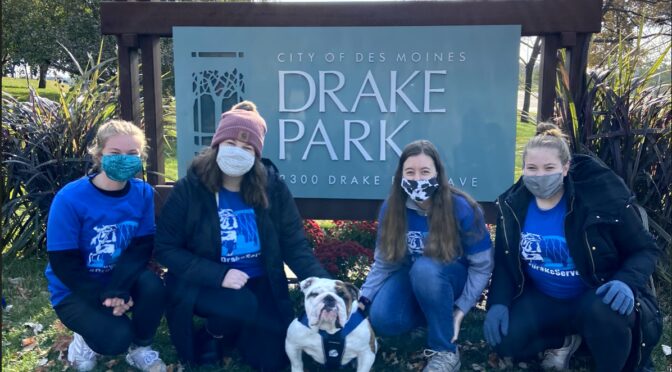
Civic Action Week is a campus-wide week of events for students, faculty, staff and the broader community to learn, engage, and encourage collective responses to persistent societal challenges. Mark your calendar for April 5–10 for a number of in-person volunteer opportunities, virtual remote opportunities, and educational events.
Examples of events include a fun kick-off event with trivia, a Careers in Social Change Panel, a ribbon-cutting at the new Sprout Garden, a neighborhood walk, and a number of donation drives.
Prizes will be given throughout the week. Share how you give back or what you are doing to celebrate Civic Action Week by tagging @drakeservice #DrakeServes on social media.
Civic Action Week will center around the Pathways for Civic Action and Social change. We recognize that there are many strategies needed to create change; the Pathways include: Community Engaged Learning and Research, Community Organizing and Activism, Direct Service, Philanthropy, Policy and Governance, and Social Entrepreneurship and Corporate Responsibility.
Learn more or contact amanda.martin@drake.edu.
— Amanda Martin, Community Engaged Learning
Employee and Family Resources spring webinar series
Employee and Family Resources is continuing their monthly webinar series and have a full slate of presentations ready for spring. All webinars are free to attend. View a full list of upcoming classes and registration.
If you have missed past webinars, they are available for viewing on their website.
EFR offers a variety of Employee Assistance Program (EAP) resources to help you now or anytime. Reach EAP by phone (800-327-4692) or visit their website at https://efr.org/how-we-help/work/. All EAP benefits are confidential and available 24/7/365.
— Linda Feiden, Human Resources
Bright College now accepting course proposals
The John Dee Bright College at Drake University invites full-time faculty on continuing appointment and faculty emeriti to submit course proposals for its Spring 2022, 12-credit integrated seminar on Global and Natural Systems. Responses by Monday, April 12, will receive full consideration.
This seminar will serve as the second of four integrated seminars in the Bright College curriculum and will be taught by a multi-disciplinary team of two or three faculty (depending on cohort size, faculty expertise, and course design) as their primary teaching and service assignment during the Spring. Proposals are welcome from individuals as well as from teams already formed. Please see the catalogue description below for details about the general course outcomes and framework.
Standard compensation is $4,000 in addition to the faculty member’s base salary and reassignment from teaching in their home departments; however, there is considerable flexibility in the exact configuration of an individuals’ assignment. Craig Owens, dean of the College, will work with department chairs, program directors, and fellow deans to facilitate the appointment of faculty whose course is selected for inclusion in the 21-22 curriculum.
Preliminary submissions should include a brief course description and a representative list of learning activities that support course goals. Courses should be based on collaborative, high-impact, active and experiential learning and on problem/challenge-based approaches to problem-solving and learning by doing. Please bear in mind that Bright College does not employ a lecture model of instruction or an examination approach to student learning assessment.
Proposals and queries can be sent to craig.owens@drake.edu by Monday, April 12.
Catalogue Description
JBC 055: Integrated Seminar in Global Natural and Social Systems
12 credit hours (2-3 instructors)
Fall 2022
Outcomes
- Global and Cultural Understanding
- Scientific Literacy (including lab/fieldwork)
- Historical Foundations
In this seminar, students will gain competence as systems thinkers as they investigate and map the interrelationship among globally interconnected systems of social organization, power, and the distribution of goods, on the one hand, and such scientifically inflected systems as the natural environment, public health, and healthcare, on the other. Students will learn about the influence of policy, history, and the physical and biological forces on the dynamics governing—and created by—these systems. Working in collaboration with their peers, participants will engage in direct scientific inquiry and data collection and will map these systems as steps toward designing interventions to improve identified outcomes. Examples of topics this seminar might pursue include (but are not limited to): global response to pandemics; global water policy and health; eco-tourism; globalism and the green economy; the politics and economics of healthcare in the global south; national health care in a global environment.
— Craig Owens
Great Colleges to Work For survey: Your input is still needed!
Thank you to the 47 percent of faculty and staff who have completed the Great Colleges to Work For survey. For the remaining 53 percent—we need to hear from you!
The survey period ends Friday, April 2, so if you have not completed the survey, please consider taking this opportunity to make your voice heard.
— Nate Reagen, Office of the President
Deadline approaching: Get paid for your business/business idea
Applications are being accepted until 11:59 p.m. on Sunday, April 4, for the Pappajohn Student Entrepreneurial Venture Competition. Apply online or download a PDF to submit by email. Sponsored by John Pappajohn and Equity Dynamics Inc., the Pappajohn Student Entrepreneurial Venture Competition is open to any Iowa college or university student who wants to start their own venture. Regional winners in the Pappajohn competition receive $500 and three statewide finalists will receive $5,000.
Please visit https://bit.ly/30kvcPX to learn more and download a PDF of the application, visit https://bit.ly/2OpySgU to apply online, or email jpec@drake.edu for more information.
Don’t miss out on your chance to get seed funding for your venture. Apply today!
— Stephanie Cardwell, Buchanan Center for Entrepreneurial Leadership
Read the final week of shout-outs!
As part of Staff Appreciation Month, Human Resources has been sharing shout-outs submitted by faculty, staff, and students. Thanks to everyone who participated this month!
Even though Staff Appreciation Month is coming to an end, please continue to find ways to show your appreciation to staff, faculty, and students across campus. We can all use a “socially-distanced” pat on the back!
Read the shout-outs submitted this week!
“A shout-out to the Facilities, Planning & Management Team: Thank you so much for all of the work you do to keep our study spaces clean! I have been especially thankful for you during the pandemic while you have kept us all safe. We all appreciate you so much and I am grateful to have such a great facilities team!” – Katelyn Mardis
“A shout-out to the ASC Executive Team: A BIG thank you for the members of the All Staff Council Executive Team (Marina Verlengia, Andy Verlengia, Linda Feiden, Jenny Jones, Tyler Spoon, Michelle Huggins, Amelia Klatt, Dani Peters, Laura Bjurstrom, Kevin Saunders, and Leslie Noble). This is a wonderful group of staff to work with, and they spend time above and beyond their normal workloads to both lead a committee, and serve as an Executive Ambassador. It is not a small commitment, and they do a wonderful job of leading and providing programming and recognition for staff. Thanks for the extra time and dedication you provide to campus!” – Sara Heijerman
“A shout-out to the Environmental Health and Safety Team: Thanks to the EHS team for the million things, seen and unseen, that you had to deal with during the pandemic. Thank you for leading campus through a crazy time for which there was no playbook.”
“A shout-out to the Custodial Team: Thank you to the custodial team that takes care of campus each day. You gave extra attention this year to keeping things sanitized and safe, and we so appreciate your work!”
“A shout-out to Christine Urish: Finding mindfulness resources to help faculty and staff mitigate stress and improve overall wellbeing is an ongoing goal. Christine has graciously taken time out of her own busy schedule to facilitate multiple Koru mindfulness classes. They have all been well received. In addition, she facilitated a Mental Health First Aid for Higher Ed class last year. Her kindness and warm personality put everyone at ease. A rare quality indeed!” – Linda Feiden
“A shout-out to Sara Heijerman and Andy Verlengia: Sara and Andy are current chair and co-chair of the All Staff Council Executive Committee. These positions always require additional work, but this year has created unique challenges and the need for some creativity to support Drake’s staff. They were certainly up to the challenge. If you know Sara and Andy, you know two of the most positive people to grace our campus. Their kindness and enthusiasm create a welcoming culture that represents the best of Drake.” – Linda Feiden
“A shout-out to Kerwin Dobbins: Kerwin Dobbins has been an exemplary Parliamentarian for Faculty Senate this year. He always has time for questions, is willing to research guidance on particular issues, and keeps the Senate on track as we discuss items and pass motions. He has created “cheat sheets” for me and answers queries on the fly in the chat during meetings. Faculty Senate would not have had such a productive year without his careful guidance. Many thanks to Kerwin!!” – Shelley Fairbairn
“A shout-out to members of Drake’s contact tracing team—Linda Anderzhon, John Amato, Ryan Arnold, Laura Bjurstrom, Kisha Burkett, Amelia Klatt, Doug Lampe, Nate Reagen, John Smith, Tim Tesar, Meaghan Tigges, Emily Weaver, Heidi Weiss, Cathy Williams, Drinda Williams, and Andy Verlengia: These individuals have devoted countless hours, from 9:00 am to 9:00 pm, seven days a week in helping students navigate CDC guidelines and Drake policies regarding public health and the coronavirus. ‘We’re all in this together’ embodies the spirit of this team.” – Scott Law
“A shout-out to Deneen Dygert: Drake campus visits have required a complete overhaul during this pandemic and Deneen has stepped up to serve at every turn – virtual, in person, back to virtual, and in person. She does all of this with strength, positivity and enthusiasm – a true duck on water. This university is so lucky to have her.” – Anne Kremer
“A shout-out to Lilianna Bernstein: Lil takes such pride in how Drake looks in the eyes of the student, giving personality to our communications every opportunity she gets to ensure we stand out from the pack. She ensures that our staff and our families continue to have fun with our communications as the cycle unfolds – thank you for making us look so good!” – Anne Kremer
“A shout-out to Rachelle Setsodi: Rachelle has stepped up to serve as an associate director this year as a one woman show as we searched for a new assistant director. We are grateful to her ever-present positive attitude, enthusiasm and willingness to drive new strategies forward with our transfer students. She never fails to keep her students at the heart of everything she does.” – Anne Kremer
“A shout-out to Amy Nichols: Amy and her team have led us through some exciting changes this year leading to the most applications and admits in school history! She works hard to also ensure our leadership team has the data we need to make decisions, especially this time of year as the cycle twists and turns in the final weeks of the cycle.” – Anne Kremer
“A shout-out to Evan Favreau: Evan has been a voice of calm and steady waters throughout this pandemic. In addition to managing a territory and serving families, his biggest contributions are ensuring that our first-year team feels supported and connected with our strategies and the office. We are so appreciative of his leadership daily!” – Anne Kremer
“A shout-out to Rachel Butler: Rachel consistently looks for ways to help Drake and our brand stand out in a large market – and we love her enthusiasm and how she consistently works to get Drake in front of every audience she can! She puts her heart into her work both as a counselor and a supervisor – it is evident she cares deeply about both.” – Anne Kremer
“A shout-out to Lisa Flynn: Lisa has stepped up this past year both to serve as an assistant director taking on a new territory – AND has been fearlessly leading our admission and recruitment efforts with Johnny Dee Bright College. No matter what she has going, she is calm, graceful and organized. She is engaged with her families and knows how to meet them where they’re at throughout this entire process.” – Anne Kremer
“A shout-out to Ethan Fickau: A team player– through and through. Ethan not only has a solid pulse on what is happening with his students, but he cares deeply about his alma mater and ensuring there are streams of proud Wisconsinites filling Drake class seats in the future. He also makes sure to meet with every one of his families that has been on campus this spring – we so appreciate his dedication!” – Anne Kremer
“A shout-out to Donna Tuttle and Joy Bachmann: You are here, rain or shine, with or without electricity, and with or without heat, to care for our animals every single day! You not only care for the animals, but you care for the people who work with them! From making beautiful face masks to bringing in little treats for the students, you make Drake a far better place.” – Deb Christensen
“A shout-out to Angie Dahl: Angie has led Drake Athletics Sports Medicine department through the pandemic. As a member of the Athletics COVID Working Group, she has been transformative and creative as we figure out how to safely compete during a pandemic. Her leadership carries over to the Missouri Valley Conference with her contributions to the Conference COVID Working Group and as the voice of the league athletic trainers on NCAA and conference matters. March is National Athletic Training month. We salute Angie’s expertise and heart for the student-athletes.” – Megan Franklin
“A shout-out to Lisa Murphy and the Recreation Sports staff for creating fun and safe programs and services for Drake faculty, staff, and student-athletes to engage in during this year where we have been able to engage online and in-person. Lisa has been a member of the Athletics COVID Working Group where she brings a perspective that when we come to a roadblock she is able to bring a creative solution that gets us to a new solution. She also has the best GIFs for just the right moments. Kudos to Lisa and her staff.” – Megan Franklin
“A shout-out to Dianna Gray: Dianna works tirelessly to find innovative ways to reach potential new students for the CBPA graduate programs. When COVID hit, she learned how to host webinars so she could continue to offer information sessions to potential students in order to keep recruiting students during a challenging time. Additionally, she constantly is looking for new ways to make the admission process more efficient for new students and staff. She is an integral person on our team in the CBPA graduate programs office!” – Jenny Jones
“A shout-out to Madeline Mongar-Brodie: Madeline has been a critical piece of our work flow in the office. When we suddenly went online with student advising last spring, Madeline went through the painstaking process of converting every CBPA graduate campus student file to Teams, which allowed me to advise students seamlessly as we worked from home. She did all of this work quickly (and cheerfully!) in the middle of advising season, while we were changing class schedules at the same time. Her support has made a huge difference for myself and our students!” – Jenny Jones
“A shout-out to Jeremy Curtis: Jeremy has brought some incredibly creative ideas to the admission office since he joined us (just before the Covid pandemic)! I am so lucky to have a colleague like Jeremy! He’s constantly thinking of new and creative initiatives to help recruit students from Texas and Latin America!” – Rachel Butler
“A shout-out to Veronica McLaughlin: Veronica has taken on a much larger territory this year AND her territory interest in Drake has sky rocketed. I’m always amazed at how she manages such an incredible territory. She’s been working super hard to make sure her 600+ admits are taken care of and feel special. Veronica is so gifted at making those she interacts with feel valued and special. I’m so glad to call her a colleague!” – Rachel Butler
“A shout-out to Carmen Avila: Carmen joined the office of admission this past August – in the middle of the pandemic! I’m blown away at what she’s been able to do as a regional admission counselor in Colorado. Especially as she’s never been to Drake or Des Moines. She’s constantly adapting outreach and initiatives to mold to her unique territory needs. It’s so incredible to see her increased student population. She has been an incredible addition to our team!” – Rachel Butler
“A shout-out to Sheri Gavin from SJMC faculty, staff and students for all she does to support us and keep our financial boat afloat! A shout-out, too, to her colleagues Kathy Hickman and Geri Blaker for their help.” – Kathleen Richardson
“A shout-out to Sandra Harris: Sandra should be on the poster for ‘Commitment to Mission.’ She consistently brings a servant leader mindset to her work.” – Kevin Saunders
“A shout-out to Christine Marchand: Christine spends much of the spring season working behind the scenes to ensure successful completion of external reporting and the administration of internal surveys. Just like those daffodils outside of Howard hall, her work blooms during the spring.” – Kevin Saunders
“A shout-out to Greg Lin: Greg continues to reimagine his engagement with faculty colleagues in finding new ways to reflect on the impact of teaching and learning practices across campus. His curiosity and energy help to guide great conversations and discovery.” – Kevin Saunders
“A shout-out to Leslie Noble and Deana Cunningham in Cowles Library: These two wonderful colleagues have managed to keep Cowles Library open and running during all the different waves of the pandemic, tackling issues big and small. We are lucky to have them! Thank you both for your hard work and dedication.” – Laura Krossner
“A shout-out to Lynne Cornelius: Lynne Cornelius embodies the generosity of spirit. While we have never been in the same unit, she is always willing to help out as a colleague with events and programming in numerous capacities. I appreciate her positivity and willingness to jump in when she is able.” – Leah Berte
“A shout-out to Chrystal Stanley: Chrystal Stanley has been a fearless and creative leader and colleague this year! She has embraced technology this year hosting the first virtual diversity career fair. Our team successfully executed our first Career Conference with Chrystal helping to lead the way. She has also implemented new technology tools such as Loom and Jamboard to make career advising more engaging and efficient for students. Thank-you Chrystal for keeping us motivated as we navigated through many changes and new opportunities.” – Leah Berte
“A shout-out to Donna Knight-Donovan and Sheila Goodwin for always being so helpful and pleasant in the Cashier’s Office.” – Cheri McDaniel
“A shout-out to Kristine Plagman for having all the answers to my questions involving grants.” – Cheri McDaniel
“A shout-out to Brenda McNear for always directing our questions to the appropriate person in facilities.” – Cheri McDaniel
“A shout-out to Cheryle Anania for being wonderful to work with when scheduling meetings.” – Cheri McDaniel
“A shout-out to Jean Myers and Maria Almanza for keeping The Ray Center and all of Collier-Scripps clean and disinfected.” – Cheri McDaniel
“A shout-out to the under-appreciated staff of Cowles Library: In recent months they have: Worked to help provide remote library services during times of pandemic shut-down; helped to transition the building to allow safe access, especially for our students; been diligent about requests for information or access (I know I’ve emailed or called all of them at various times in the past year, and they were always prompt in responding). They did this and more while also remaining focused on the overall well-being of our students (including our many student employees). In alphabetical order, thanks to: Deana Cunningham, Jordan Flynn, Laura Krossner, Kathy Lincoln, Kris Mogle, Leslie Noble, Meredith Scherb, and Zoie Taylor.” – Bruce Gilbert
“A shout-out to the Career Services Team of Chrystal Stanley, Annette Watson, and Leah Berte for truly embracing the core values that define the actions of Drake staff. This academic year they welcomed me to their team to collaborate, however that resulted in including me in all career services work at Drake this year! As a result, I’ve grown as a career services professional and have been better able to serve all of our students as we embraced new technology, hosted many new events and generated new opportunities for students. Generosity of spirit really defines this team as they trust, empower, and presume the best of each other and conduct their work with civility, caring, and respect. Thank-you Chrystal, Annette and Leah!” – Carlyn Crowe
“A shout-out to Sonja Brightwell: From the very beginning of the pandemic Sonja has been unwavering in her commitment to students and families. Sonja has worked diligently to create new housing processes such as online check in, check out sign up and room selection. Sonja consistently goes above and beyond. She does her work with a generosity of spirit. You are appreciated beyond measure.” –Lorissa Sowden
“A shout-out to Jerry Parker: Jerry, you role model how to have grace under pressure. The personal touch in all that you do does not go unnoticed. Your dedication to the students, the staff, your family and Drake is inspirational. Thank you for your tireless work and answering email at all times of day and night to keep things moving forward. Thank you for your support, guidance and leadership!” – Lorissa Sowden
“A shout-out to Randy McMullin, Sara Schilling, & Hayley Ellis: I want to thank this team for their can-do attitude! You have been creative about reimagining everything from hall programming, organizational meetings, RA class and staff meetings. I want to personally thank you for your collaborative and innovative spirit. Your willingness to assist residential students with moves to isolation has also been appreciated.” – Lorissa Sowden
“A shout-out to Mitch Wieczorek: Mitch has an upbeat attitude and no matter the time of day or night, he is willing to assist. I appreciate his prompt responses and follow up on situations. I can’t say enough about his willingness to collaborate on a variety of events. The behind the scenes work he and the facility staff do to make things happen and keep us safe is appreciated. I also want to Thank Mitch for letting us borrow your personally owned tents for student curbside student move in. We are grateful to you!” – Lorissa Sowden
“A shout-out to Debra Wiley: I admire Debra’s dedication to students and staff. She makes herself available to students seeking to complete HR paperwork for campus employment. She then inputs the information into the system in record time, so that the hundreds of students working across campus can begin their employment and access their timecards in a timely manner. Deb is quick to answer phone calls and respond to emails. No matter how busy she is, she makes you feel like you are her only priority. Thank-you Deb for making Drake a great place to work!” – Lorissa Sowden
“A shout-out to the Admissions Staff for their support and recruitment for the Engaged Citizen Corps program. Special shout-out to Glenn, Grace W., and Lil for all of your help these past few months!” – Amanda Martin
“A shout-out to the FPM staff for all of their help with relocating the Sprout Garden to its new location. It was a lot of work but it is looking awesome and we are excited about the possibilities at the new space.” – Amanda Martin
“A shout-out to Sara Heijerman for helping us print at low costs, and for her speedy responses. Customer Service is a ten!” – Amanda Martin
“A shout-out to the Cowles Library custodial team, Atong and Antonio, along with Facilities, Public Safety and Student Services staff, who help keep Cowles Library open and operating smoothly. Your hard work and patience is very appreciated!” – Leslie Noble
“A shout-out to Cowles Library staff (Deana, Jordan, Kathy, Kris, Laura, Meredith and Zoie) who work incredibly hard to support library faculty and students, and the entire Drake community!” – Leslie Noble
“A shout-out to Linda Feiden: THANK YOU for always being willing to explore new programming. The OT students and myself are so appreciative of your willingness to allow us to offer wellness groups this spring semester. We are hopeful this is a program that we can continue annually! Thank you for all you do for our campus.” – Christine Urish
“A shout-out to Ali Harms & Jessica Lang: THANK YOU for making our interviewing process and student recruiting and admissions an easy process and so effective. I cannot tell you how much I appreciate you every single day!” – Christine Urish
“A shout-out to Jeannie Nielsen: I want to thank you for covering during staffing changes, maternity leave, and retina surgery. You are always there for all students, faculty, and staff in OT and I could not imagine not having you to work with. You are a dear colleague and friend and I appreciate you more than words can say. We will get through this pandemic year with smiles!!” – Christine Urish
“A shout-out to Jeannie Nielsen: Jeannie Nielsen in the CPHS Experiential Office is a wonderful person to work with. She shows caring, compassion, and dedication in her work in the office. Not only is she a huge asset to our team, she is a true friend. Jeannie makes my job easier and more enjoyable. Thank-you Jeannie!“ – Anisa Hansen
“A shout-out (thank you) to the incredible professional staff in the College of Pharmacy and Health Sciences: The professional staff add so much quality to the student experience and the overall success of the college. Thank you for all of your work and dedication!” – Chuck Phillips
“A shout-out to the CPHS staff: The CPHS staff is a group of dedicated, organized, and supportive individuals that allow our entire college to be successful. Without your daily efforts with our students and faculty, we would not be as strong of a team. Thank you for your timeless effort you give to CPHS to allow us to continue to thrive as a college and enduring all of the challenges over this past year! I am very grateful for each of you!” – Alisa Drapeaux
“A shout-out to the CPHS staff: CPHS staff, thank you for your generosity of spirit that you display every day while supporting our students, faculty, and administrators. I appreciate how approachable you all are to work with, as it enables me to work better and more efficiently on behalf of our students. I also greatly value your professionalism: being able to readily trust each of you to perform at a high level and portray CPHS in a positive manner is a huge asset to our program and a great example to both our faculty and students. My wish is for each of you to feel both happy and supported in your roles, and if there is something you feel I can do to help make this happen, I would welcome that conversation.” – Michael Nelson
“A shout-out to the CPHS staff: Thanks to the CPHS staff members for all that you do! Your willingness to pitch in, solve problems, and create a collegial and collaborative culture are greatly appreciated. You embody the values of the University and our College, and make the CPHS a great place to work, whether you are in person or on the other side of a TEAMS screen. Your additional efforts to support each other, our faculty, and our students over the past year have truly made a difference. Thank you!” – Renae Chesnut
“A shout-out to Denise Kluever: She has an extraordinary work ethic; very nurturing to students yet able to prompt professionalism and a strong professional identity with each and every student.” – Yolanda Griffiths
“A shout-out to Kaylyn Maher: She always demonstrates a can-do attitude and is a magician with graphics.” – Yolanda Griffiths
“A shout-out to Diana Newman: She is the person to go to when needing to know who to go to for answers.” – Yolanda Griffiths
“A shout-out to Jamie Rognes: A calming presence in the middle of chaotic busy times.” – Yolanda Griffiths
“A shout-out to Jill Batten: Jill is always incredibly helpful when I have questions regarding my health science advisees. She is extremely personable and quick to respond to any questions or concerns that I have and I am very fortunate to work alongside her!” – Kelsee Hove
“A shout-out to Jess Lang: Jess is extremely good at what she does. She is very reliable and organized and exhibits a rare quality of looking at things from unique perspectives and advocating for changes. If Jess doesn’t know the answer to something, you can always count on her to search until she finds it!” – Kelsee Hove
“A shout-out to Ali Harms: Ali has a way of making everyone around her feel welcome and comfortable, she is one of the most personable individuals I have ever worked with. She is very talented at what she does and always knows how to engage students in conversations!” – Kelsee Hove
“A shout-out to Denise Kluever: Denise has a true heart of gold and passion for the profession of occupational therapy. She is full of knowledge and never afraid to share her experiences with students. Denise has helped tremendously with organizing the OT building and making several connections within the community. She wants to make life easier for everyone else and always willing to help!” – Kelsee Hove
“A shout-out to Jamie Rognes: Jamie has done an incredible job transitioning into academics as a lab assistant and even teaching a class over the summer! She is very flexible and always willing to help even if it involves going out of her comfort zone!” – Kelsee Hove
“A shout-out to Diana Newman: Diana has always been very helpful with any questions that I have and extremely reliable!” – Kelsee Hove
“A shout-out to Alex Rosburg: Alex is always willing to assist with tasks with a smile on her face!” – Kelsee Hove
“A shout-out to Chris Wing: I always look forward to meetings with Chris because he has an incredible sense of humor! He brings great insight to many topics and a smile to everyone’s face!” – Kelsee Hove
“A shout-out to Jill Batten and Sydni Jennings: I have to consider them together because sometimes I am not sure who to reach out to! They are extremely prompt, helpful and kind in their responses. I think this team really adds a lot of value to our college!” – Kristin Meyer
“A shout-out to Ali Harms: Ali represents the college so well to prospective students and families. She brings a great background of admissions knowledge and is fun to do family visits with. I really enjoy working with Ali. I am so glad she’s at CPHS!” – Kristin Meyer
“A shout-out to Jessica Lang: Creatively executes her job, with a great attitude. She never overlooks thanking people for being involved in recruitment efforts. Jess makes it easy to say, “yes!” to helping out with these events.” – Kristin Meyer
“A shout-out to Kaylyn Maher: Her creativity is such an asset to CPHS. I feel like there is an increased engagement and pride from alums as a result of our social media presence.” – Kristin Meyer
“A shout-out to Diana Newman: One of those people we CANNOT do without. She is extremely knowledgeable, and helpful in making sure we have whatever we need to carry out our jobs.” – Kristin Meyer
“A shout-out to Jeannie Nielsen: She invests so much of herself in the success of our students in the experiential program. We definitely owe Jeannie a huge debt of gratitude for all she does.” – Kristin Meyer
“A shout-out to Chris Wing: He has such a wealth of knowledge that we have been able to tap into to assess and improve our programs. Chris is a great team player.” – Kristin Meyer
“A shout-out to Jill Batten: Thank you for the help you’ve given me with using Starfish in my advising!” – Sara Johnston
“A shout-out to Ali Harms and Jess Lang: Thank you for all you do to ensure OTD admissions interviews run smoothly!” – Sara Johnston
“A shout-out to Denise Kluever: Thank you for making the trains run on time in OTD, and for your assistance with designing scenarios for the Disaster Prep Presentation in Population Health.” – Sara Johnston
“A shout-out to Kaylyn Maher: Thank you for your help in getting the word out on social media about the Kuhl, Johnston & Plutschack Covid-19 survey!” – Sara Johnston
“A shout-out to Diana Newman: I always appreciate your quick and clear responses to my confusing questions about reimbursements.” – Sara Johnston
“A shout-out to Alex Rosburg: I enjoyed working with you in the OTD Program.” – Sara Johnston
“A shout-out to Chris Wing: I appreciate your assistance with OTD program assessment. Thank you also for your work on the IDEA course evals.” – Sara Johnston
“A shout-out to Megan Young: She’s always ready to help with any laptop I needed to borrow in a classroom emergency as well as always providing the service with a smile.”
“A shout-out to Diana Newman: She’s amazingly efficient when it comes to keeping track of grant expenses and purchases.”
“A shout-out to Kaylyn Maher: She’s always ready to help in the Fitch office, even when it falls outside her area of expertise.”
“A shout-out to Jill Batten: She’s always considerate, thoughtful and positive in her approach to working with myself, faculty and students. Consummate professional.” – Yolanda Griffiths
Wellness updates
Rec Services updated its group exercise schedule and added two new classes: HIIT on Wednesdays at 7 p.m. and Express Abs on Fridays at 11:45 a.m. Also, a quick 30-minute workout is offered at 12:15 p.m. any day of the week. These classes are lower intensity and perfect to help break up your day and get your body moving.
Did you know Rec Services is hiring? If you’re interested in teaching an exercise class or working in the wellness field, email wellness@drake.edu.
IM registration deadlines:
Sand volleyball: Wednesday, March 31
FIFA: Wednesday, March 31
— Emily Madsen, Rec Services