
Handshake is Drake’s online career platform, featuring thousands of internships and jobs, networking opportunities, and event information. All Drake students receive free access to Handshake using their Drake email and password. Faculty and staff can help students get the most out of Handshake!
Create a Student Account
Handshake does not have a faculty or staff account option, so faculty and staff are encouraged to create a student account. It is a great way for professors, Faculty Mentors, and advisors to explore Handshake and assist students in navigating and using the platform effectively. You can create an account at drake.joinhandshake.com.
Please note: if you already have an EMPLOYER account on Handshake through Drake, you can create a student account but please follow these instructions.
Review the Student Account FAQs to help understand how you and the students you support can get started and make the most of Handshake.
View Work Study Eligibility for On Campus Employment
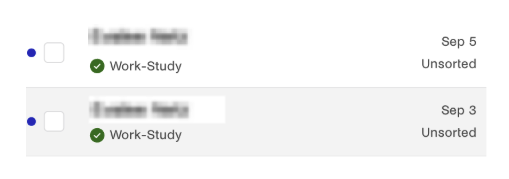
For faculty and staff student supervisors and timesheet managers, you can now see Federal Work Study (FWS) eligibility in Handshake. Be sure to check “yes” under Work Study Program when creating your position on Handshake (almost all on-campus jobs are work study eligible). When you click on your list of applicants, you will now see a green check mark with “Work-Study” under students’ names who are FWS-eligible. You will also see this if you click on a student’s name. Drake requests that you prioritize FWS-eligible students in your hiring practices.
Questions? Reach out to Career Services.
— Amanda Martin, Academic Excellence & Student Success