Category Archives: For Faculty Archive

New features available in Collaborate Ultra 

Blackboard Collaborate Ultra is making improvements to security and adding new meeting features, along with other updates.   

June 13 changes:  

Shared camera option:  The share camera option gives you the ability to share more than one camera. Share your video and share another camera connected to your computer. Students can see you and anything else you want to show. You’re only limited by the number of cameras and USB ports in your computer. NOTE: The video will appear backwards to you in the preview but will appear correctly to others in the session and in recordings.

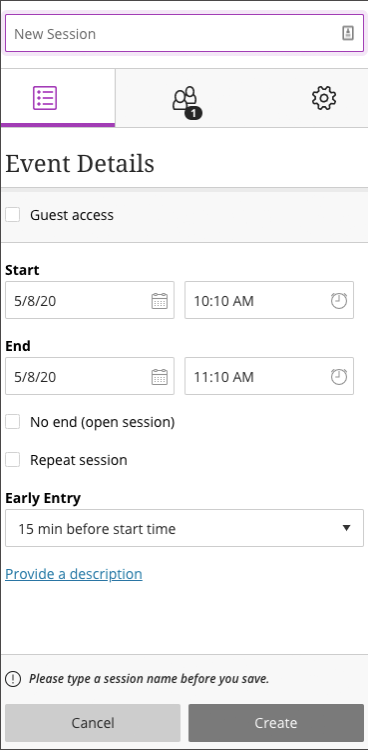
New edit session layout: The settings are separated into three tabs rather than three expandable menus. Update user experience for creating and editing sessions which also prevents unintended changes to a session from being accidentally saved. Administrators and session owners now need to save changes with the Save button.
Download polls: Now moderators, instructors, and administrators can download a session’s Poll report. This report (found in the Session Reports) includes the poll question and how each attendee responded.  

Download recordings: Recordings are available all the time for session owners and system administrators. Use the Allow recording downloads check box to let everyone else download the recording.

Whiteboard tool updates: It is now easier to select and rotate items on the whiteboard.  

Added in April/May:  

Guest access changes to improve security: The Guest Access check box is clear when a new session is being created. The check box must be selected to allow guest access. Scheduler users still have the option to enable guest access if they choose, in order to allow public access to their session.   

Meetings larger than 250 members (webinar mode): More on Collaborate’s webinar mode. Current upper limit is 500 members. 

July 16 update:  

  • Improved security on all new recordings 
  • Public access is now “off” by default for new session recordings.  
  • Only those enrolled in the course can view recordings by default. 

 — Karly Good, ITS
New dial-in conferencing feature coming to Microsoft Teams

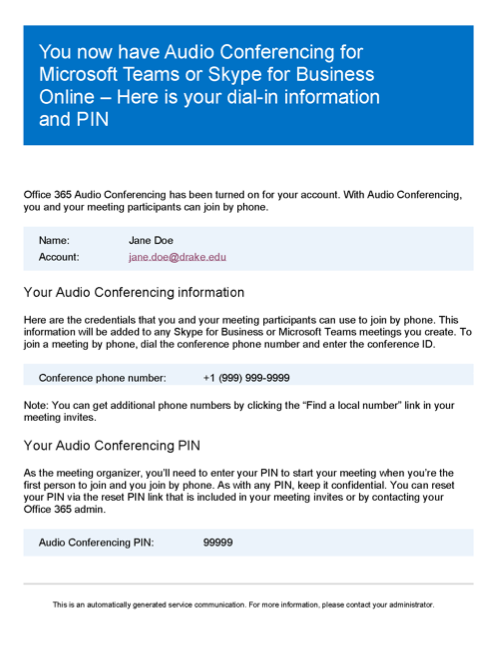
ITS is updating current campus Microsoft licenses to a new version that will allow all faculty and staff to take advantage of the dial-in conferencing capabilities of Microsoft Teams. After the new licensing is applied, you will be able to schedule meetings in Teams and have attendees join meetings by calling a toll free phone number instead of using the Teams app. As the new licensing is applied, you will receive an automated email letting you know your conference phone number and associated PIN. Please watch your inbox for an email like the example below in the coming week. We recommend that you save this email for future reference.

For more information on using Teams for meetings, see Holding Virtual Meetings Using Microsoft Teams (Best Practices).

— Christopher Mielke, ITS

Fall textbook adoptions needed

As your bookstore, we understand a lot more is going into your decision-making process for fall adoptions in this COVID-19 world. We know you are facing new challenges as more courses adjust to online formats. We have reached the end of June and students are less two months away from arriving on campus.

As always, we ask for your adoptions as early as possible so we can better source used materials that may be available. In addition, timely textbook adoptions keep campus in compliance with the Higher Education Opportunity Act (HEOA). To this end, we want to work with you to assist in any way that will allow you to make your textbook adoption decisions and allow us to get the postings completed. While we recognize that some of you may still be trying to make decisions, this is only a friendly reminder that Fall textbook adoptions were due on April 15.

Reach out if you need any assistance maneuvering Follett Discover or feel free to email or call with your adoptions or concerns. We look forward to hearing from you and seeing you again soon!

Three easy steps to access Follett Discover through Blackboard

  1. Log into myDrake.
  2. Click on the Bb icon on the main ‘mydrake’ screen.
  3. Find the Tools channel, scroll down and click the Follett Discover link OR find the Follett Discover channel and click the Launch Discover link.

— Donna Hallstrom & Katie Wilz, University Bookstore

Drake’s Speaking Center

Drake’s Speaking Center, which was on hiatus in the 2020–2021 academic year, will be reopening in Fall 2020. More details will be forthcoming as the semester approaches, but if you have used the Speaking Center in your classes in the past, you can include it in your planning for the fall.

— Arthur Sanders, Associate Provost

FAFSA requirement for tuition rebate

The University will now require all students pursuing an undergraduate degree from Drake University to complete the FAFSA prior to July 1 (preceding the academic year enrolled) as part of the Tuition Rebate Application process.

This requirement ensures that eligible students are considered for the Iowa Tuition Grant (which partially funds tuition and reduces the cost of offering this benefit). In addition, students will be considered for the Federal Pell Grant, which would be available to cover the costs of other educational expenses like room, board, or books.

This new requirement became effective April 1, 2019. This requirement may be waived students who can demonstrate that they would not qualify for the Iowa Tuition Grant (see the Tuition Rebate Policy for details).

— Brandy Eganhouse, Student Financial Planning

Fall adoptions needed

As your bookstore, we understand a lot more is going into your decision-making process for fall adoptions in this COVID-19 world. We know you are facing new challenges as more courses adjust to online formats. We have reached the middle of June and students are two months away from arriving on campus. We are at 50% of the titles we would expect so the importance of preparing for Fall is upon us all.

As always, we ask for your adoptions as early as possible so we can better source used materials that may be available. In addition, timely textbook adoptions keep campus in compliance with the Higher Education Opportunity Act (HEOA). To this end, we want to work with you to assist in any way that will allow you to make your textbook adoption decisions and allow us to get the postings completed. While we recognize that some of you may still be trying to make decisions, this is only a friendly reminder that Fall textbook adoptions were due on April 15.

Reach out if you need any assistance maneuvering Follett Discover or feel free to email or call with your adoptions or concerns. We look forward to hearing from you and seeing you again soon!

Three easy steps to access Follett Discover through Blackboard

  1. Log into myDrake.
  2. Click on the Bb icon on the main ‘mydrake’ screen.
  3. Find the Tools channel, scroll down and click the Follett Discover link OR find the Follett Discover channel and click the Launch Discover link.

— Donna Hallstrom & Katie Wilz, University Bookstore

Fiscal year-end purchasing guidelines

With the University’s fiscal year-end (June 30, 2020) approaching, below are recommended guidelines for efficient and effective year-end processing of purchases.

In accordance with generally accepted accounting principles, Drake is required to report transactions in the proper fiscal period. For that reason, expenses are recorded in the period when goods are received and/or services are rendered. In short, items expensed to a FY20 budget will need to be received before June 30, 2020.  Factors such as budget allocation, invoice receipt, or payment issuance would not have an impact on the application of expenses within a fiscal period.

Exceptions to this general rule apply when a benefit of service or receipt of item extends into multiple fiscal years. In such cases, the following guidelines will be applied.

  • Expenses less than $5,000: will be charged against the fiscal year in which the majority of the expense will be incurred. (For example, if a subscription is purchased for $3,000 and covers the period of 7/1/19 through 12/31/20, the expense would be charged to FY20)
  • Expenses greater than or equal to $5,000: will be split into the fiscal years according to the percentage of benefit received during each fiscal period. (For example, if a subscription is purchased for $10,000 that covers a period of 7/1/19 through 6/30/21, $5,000 would be charged to FY20 and $5,000 charged to FY21)

The University’s guidelines for year-end purchases are subject to external audit. As you make purchases during this period leading up to and overlapping our fiscal year end, it is important to note when the goods or services were received so they are expensed according to reporting requirements. If the timing of receipt is not clearly noted on the invoice, it would be beneficial to help call the receipt date to accounting’s attention by clearly marking the appropriate fiscal year for the expense, based on the above guidelines, on the pay request.

Please contact Jeni Baugher at x4509 or Jenifer.Baugher@drake.edu with any questions you might have.

View the year-end timeline

Heather Travis, Finance and Administration

Staying safe around always-listening devices  

With the overwhelming popularity of always-listening devices including Amazon Echo, Google Home, and smartphones, you’ve probably heard stories of these devices joining in on conversations without being prompted. It might have even happened to you!

These devices are also not designed or built with security in mind, which often leaves them vulnerable if your home network is not securely configured.  

Here are some tips to protect your private information, and conversations, from these always-listening devices: 

  • Review and delete voice recordings. Your device stores your search and activity history to create a customized experience. To protect your privacy you can review and delete these recordings from the device. 
  • Mute the microphone. You can mute the microphone to ensure that your device is not listening and recording when you are not using it. It won’t record until you turn the microphone back on.
  • Don’t link accounts with sensitive information to your device. If you have any accounts containing personal or university information, don’t link those accounts to your device. This will prevent that information from being impacted by any potential breach.
  • Change the settings to manually manage data stored by the device. Managing what data is connected with your account will give you more control over the information that is being stored and will make it easier for you to delete your history.
  • Turn off your device when you’re away. If your device doesn’t have a power button, simply unplug it.

By creating habits to better control these always-listening devices, you can protect your personal information and prevent this modern twist on phishing.

ITS will continue to simulate phishing attacks and assign training to those most susceptible. If you believe you’ve been targeted, see Reporting a Phishing Message (How-to)

— Peter Lundstedt, ITS 


Campus network access changes coming soon

Over the past several months, ITS has been working on a project requested by the Board of Trustees to improve the overall security of the Drake campus network.

We are implementing a system called network access control (NAC), which will allow us to manage access to Drake services based on a person’s campus role and/or the type of device they are using to connect to the network. This change has already been implemented for students since migrating to the eduroam wireless network this past fall.

Additional roles and access levels for faculty and staff and specific types of devices will be introduced in late July. Watch for more information about these changes in the coming weeks.

— Carla Herling, ITS

Masterclass Live Pie Baking with Provost Mattison

Take a break and clear your mind during this stressful time and learn how to make a delicious apple pie with Provost Sue Mattison. Provost Mattison will make her famous apple pie live on Teams while the audience has the opportunity to ask her questions—preferably about baking and to get to know her a little more (no work-related questions please). 

The event is Monday, June 22, from 3–4 p.m. and the link to the event can be found here. 

All attendees will be entered into a raffle for a parking pass for next year. Attendees who ask a question in the Q&A box will be eligible to win Bulldog Bucks. Participants who bake along and send in pictures of their apple pie to ascspecialevents@drake.edu will have the opportunity to win Bulldog Bucks and Griff socks!

However you want to participate is up to you—just watch, ask questions, or bake along—but we hope you will participate in this fun, virtual, family-friendly event.

Apple Pie Ingredients:
3-ish cups all purpose flour
A bit of salt
A little milk or an egg white
1.5-ish cups sugar—I like the grainy “sugar in the raw”
2.5-ish sticks unsalted butter
1/4-1/3 cup vegetable shortening
4 Granny Smith apples
Cinnamon
Ground Ginger
Ground Cloves
Ground nutmeg

— Sponsored by the All Staff Council Events & Community Service Committee